
The initial setup of an entity database with integrated telemetry requires substantial manual configuration. Developers building solutions for clients and technical operators bootstrapping operations must define schema structures, configure API endpoints, and establish relational integrity between physical assets and time-series logs before a single metric can be ingested. This initialization phase delays functional deployment and increases setup friction.
Omnismith addresses this setup delay by exposing its backend OpenAPI specification directly to an integrated AI Assistant. This architecture allows the assistant to interpret structured schema requirements written in natural language, map them to operational API endpoints, and deploy completed schemas on a blank project in real time.
The AI-Assisted Cold-Chain Fleet Management Schema
To bypass this manual boilerplate, a user can submit a single, plain-text request directly to the Omnismith AI Assistant interface:
“Create a fleet management schema with Vehicles, Shipments, and Drivers. Link shipments to vehicles and drivers, and track temperature and fuel metrics on vehicles.”
The AI Assistant directly parses this requirement, coordinates the dependent operations, and executes the necessary API calls in sequence against the live platform.
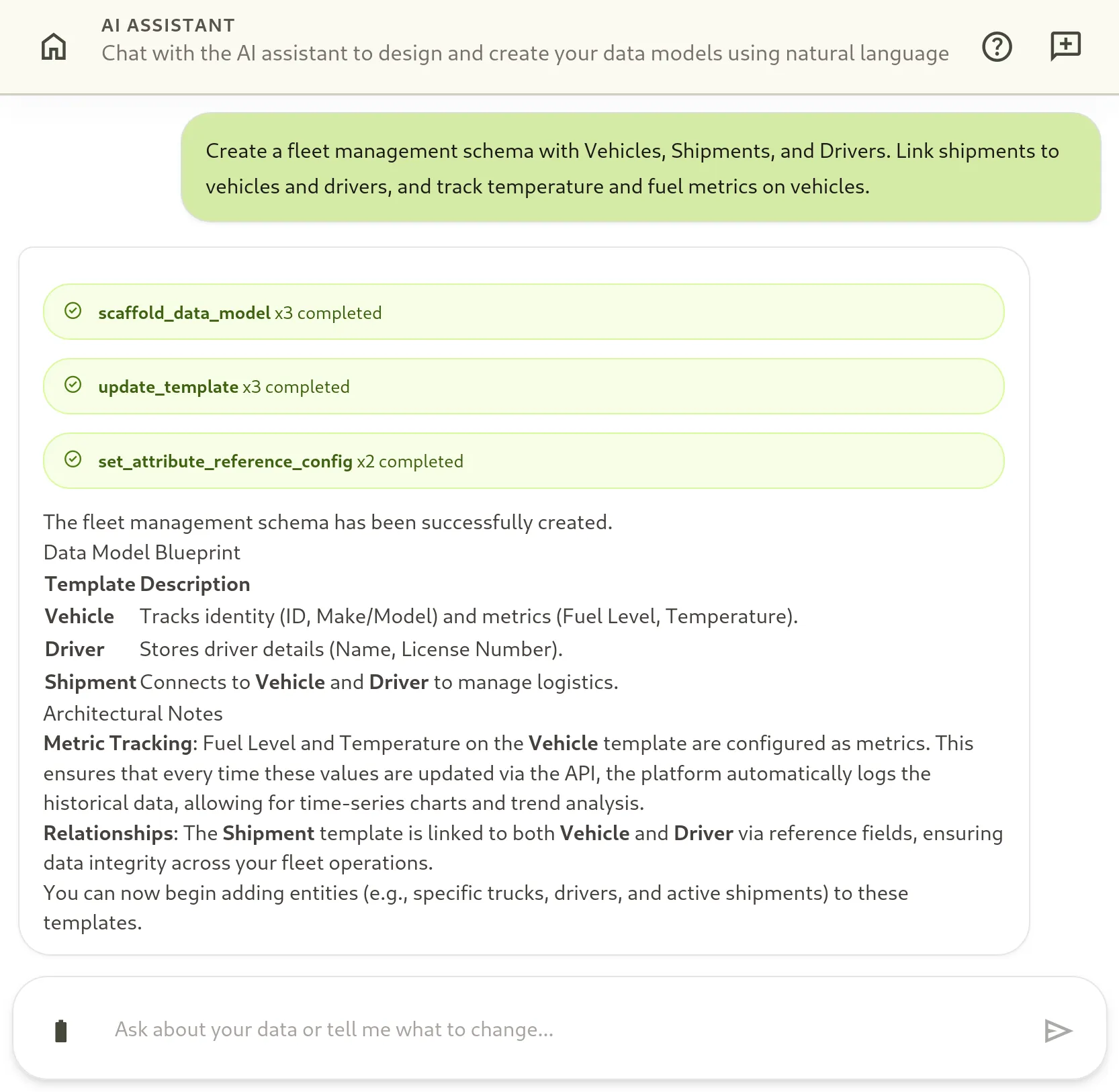
Step 1: Automated Model Scaffolding
Upon receiving the prompt, the assistant acts as a high-level database orchestrator. It immediately identifies the three primary entities: Vehicles, Drivers, and Shipments.
To minimize network overhead, the assistant calls a consolidated system orchestration tool, scaffold_data_model, to register the core templates and their initial properties inside the dynamic Entity-Attribute-Value (EAV) database:
Vehicle Generation
The assistant identifies the requirement to track identity, model, fuel, and temperature. It packages these into the first scaffold payload:
- Tool:
scaffold_data_model - Payload:
{
  "templateName": "Vehicle",
  "attributes": [
    {"name": "Vehicle ID", "type": "text"},
    {"name": "Make/Model", "type": "text"},
    {"name": "Fuel Level", "type": "number"},
    {"name": "Temperature", "type": "number"}
  ]
}
Driver Generation
The assistant scaffolds the profile template required to represent staff records:
- Tool:
scaffold_data_model - Payload:
{
  "templateName": "Driver",
  "attributes": [
    {"name": "Driver Name", "type": "text"},
    {"name": "License Number", "type": "text"}
  ]
}
Shipment Generation
The assistant maps out the shipment record structure, registering placeholders for relational references pointing to the driver and vehicle:
- Tool:
scaffold_data_model - Payload:
{
  "templateName": "Shipment",
  "attributes": [
    {"name": "Shipment ID", "type": "text"},
    {"name": "Destination", "type": "text"},
    {"name": "Assigned Vehicle", "type": "reference"},
    {"name": "Assigned Driver", "type": "reference"}
  ]
}
Step 2: Closed-Loop Validation and Refinement
Omnismith utilizes a closed-loop validation engine. To verify complete execution, the assistant reads the newly deployed schema back from the platform and evaluates it against the logical requirements.
This verification pass ensures structural and temporal properties are precisely configured before telemetry ingestion begins. The assistant executes a target refinement step:
- Telemetry Metric Promotion: The initial scaffolding pass registered the
Fuel LevelandTemperaturefields as baseline numerical attributes. To support high-frequency time-series chart streaming, the validation loop promotes both fields to telemetry-optimized metric fields (data_type: 1).
Step 3: Establishing Referential Integrity
With clean template shapes in place, the assistant completes the schema by weaving the logical connections between the templates.
It maps the dynamic reference parameters on the Shipment template, instructing the relational system to look up concrete, real-time records from the Vehicle and Driver registries:
- Vehicle Link: The assistant maps the
Assigned Vehiclereference attribute directly to the display attribute of the targetVehicletemplate. - Driver Link: The assistant repeats the relational mapping for the operator records.
Because the Omnismith database engine runs on a fully dynamic runtime schema, these alterations execute instantly with no physical database migration files, zero downtime, and zero manual endpoint compilation.
Structural and Behavioral Tradeoffs
Conversational schema scaffolding trades absolute, deterministic predictability for rapid development speed.
When developers write declarative ORM schemas, migration scripts, or JSON configuration models, the resulting environment matches the written code exactly. When relying on an LLM-driven assistant, overly descriptive instructions or grammatical nuances can sometimes require structural verification passes.
To offset these behavioral risks, Omnismith relies on two structural guardrails:
- Closed-Loop Verification: The agent continuously diffs the deployed API state against the intended design model, using targeted calls to refine structural details on the fly.
- Visual Verification Layer: The resulting schema displays immediately in the web application’s Template Library and Attribute Library. This allows developers to manually tune specific relationship constraints, tweak validation parameters, or tighten boundary conditions before ingesting operational telemetry.
Populating the Schema: Conversational Entity Ingestion
With the database structure actively running, the AI Assistant can manage concrete records within the newly established dynamic templates. Operators can query, analyze, and seed the environment.
To prepare the environment for operational testing, a user can submit a direct request to populate the fleet system:
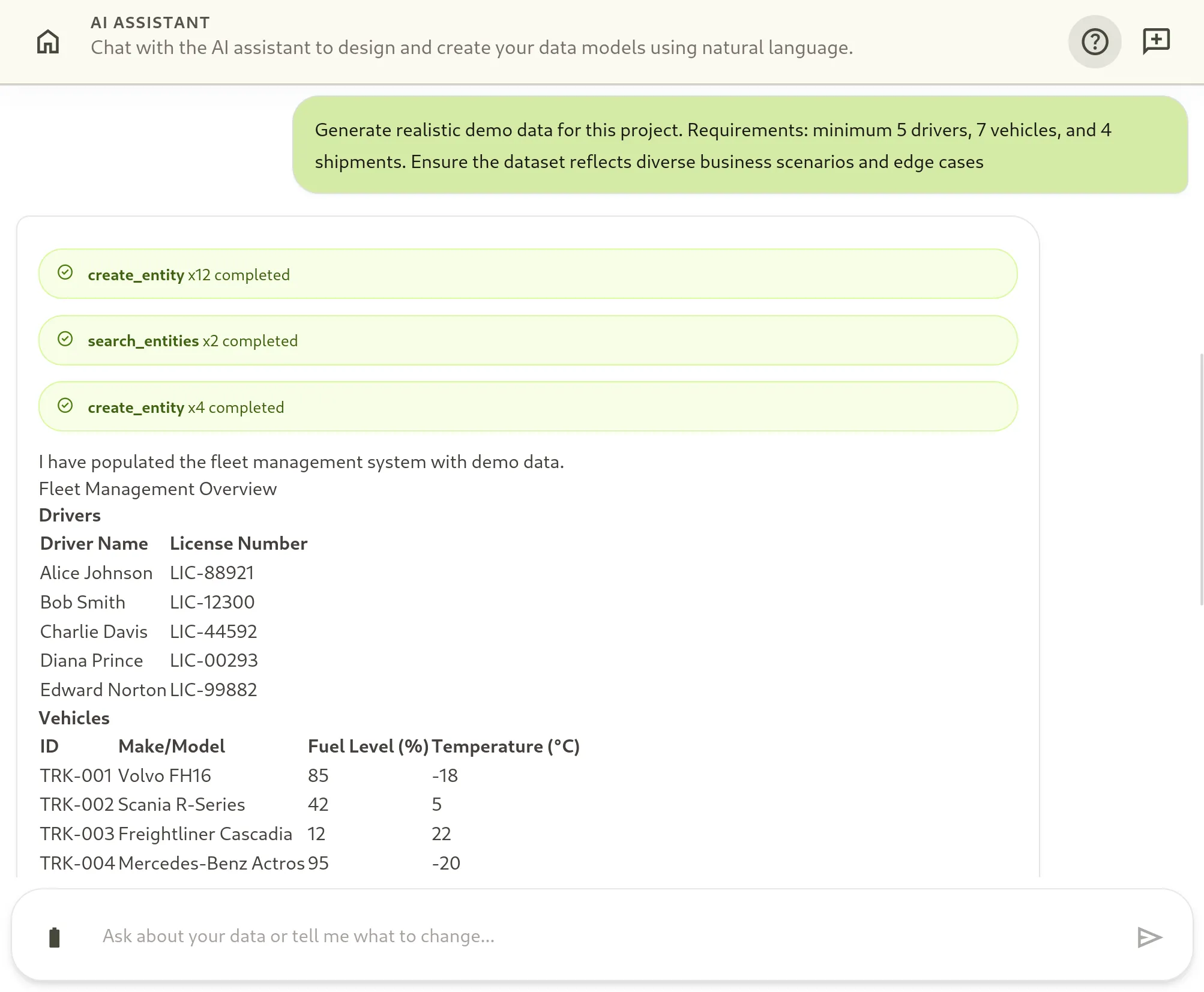
“Generate realistic demo data for this project. Requirements: minimum 5 drivers, 7 vehicles, and 4 shipments. Ensure the dataset reflects diverse business scenarios and edge cases”
Because shipments contain strict relational constraints—requiring references to physical vehicles and registered drivers—the AI Assistant cannot execute these creations as a single batch. It coordinates a logical multi-step deployment strategy shown in the interface trace:
- Independent Ingestion: The assistant first registers the independent primary resources. It calls
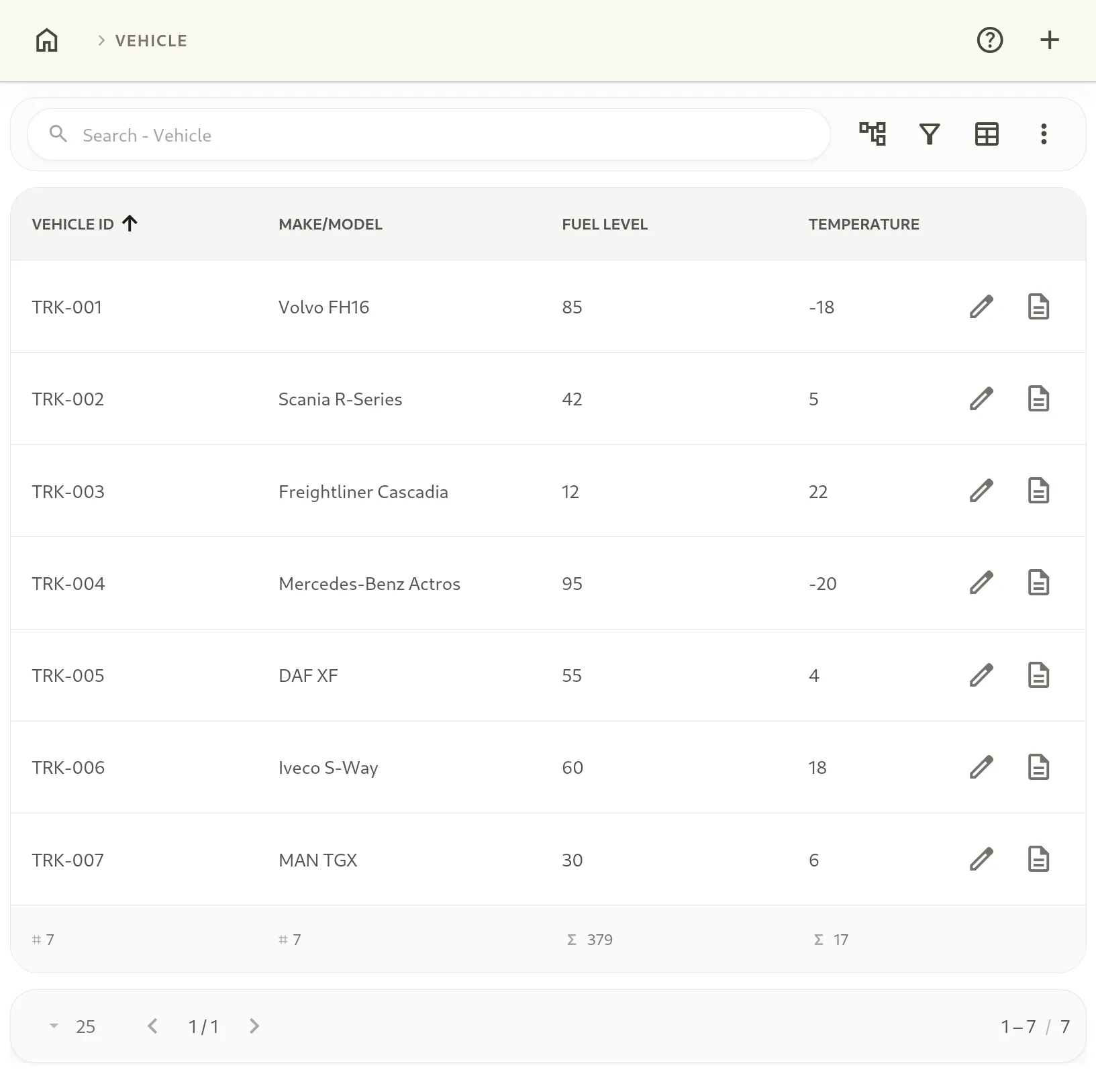
create_entity12 consecutive times to instantiate 5 unique driver profiles and 7 physical fleet vehicles with varied baselines. - Reference Resolution: To link the upcoming shipment logs to these exact entries, the assistant executes 2 calls to
search_entities. This returns the dynamic database state, mapping the human-readable driver names and vehicle license IDs to their platform-generated UUIDv7 keys. - Relational Ingestion: With the required reference keys resolved, the assistant executes the final 4
create_entitycalls. This populates theShipmentrecords, mapping individual waybills to the resolved vehicle and driver identifiers while introducing complex logistics parameters (such as sub-zero frozen cargo targets and baseline fuel levels).
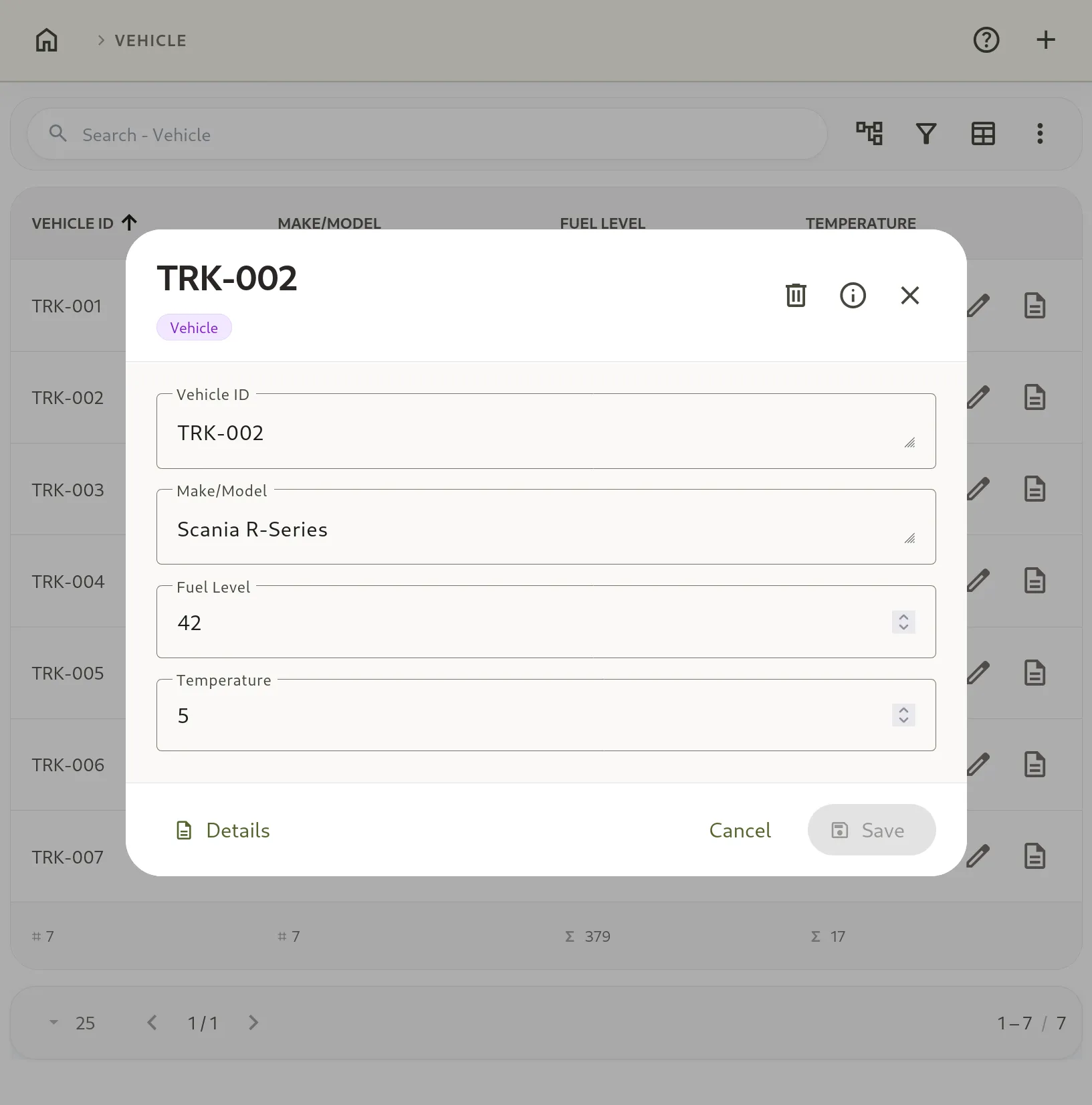
The resulting records populate the system instantly, providing technical operators with a functional sandbox that models actual business environments.
Operational Readiness
The finalized schema produces an immediately queryable, typed database structure. Every template and attribute is initialized with a distinct, immutable UUIDv7. The platform is ready to accept ingestion streams and transactional updates immediately:
- Real-time Ingestion: Temperature sensors mounted on fleet assets can start streaming sensor metrics straight to the platform’s high-volume metric stream using the endpoint:
POST /v1/entities/{entity_id}/metrics. This bypasses the primary document update path, sending values directly to TimescaleDB for sub-second chart visualization. - Relational Search Queries: The query engine natively resolves the references established by the assistant. Operators can run complex queries to filter all active
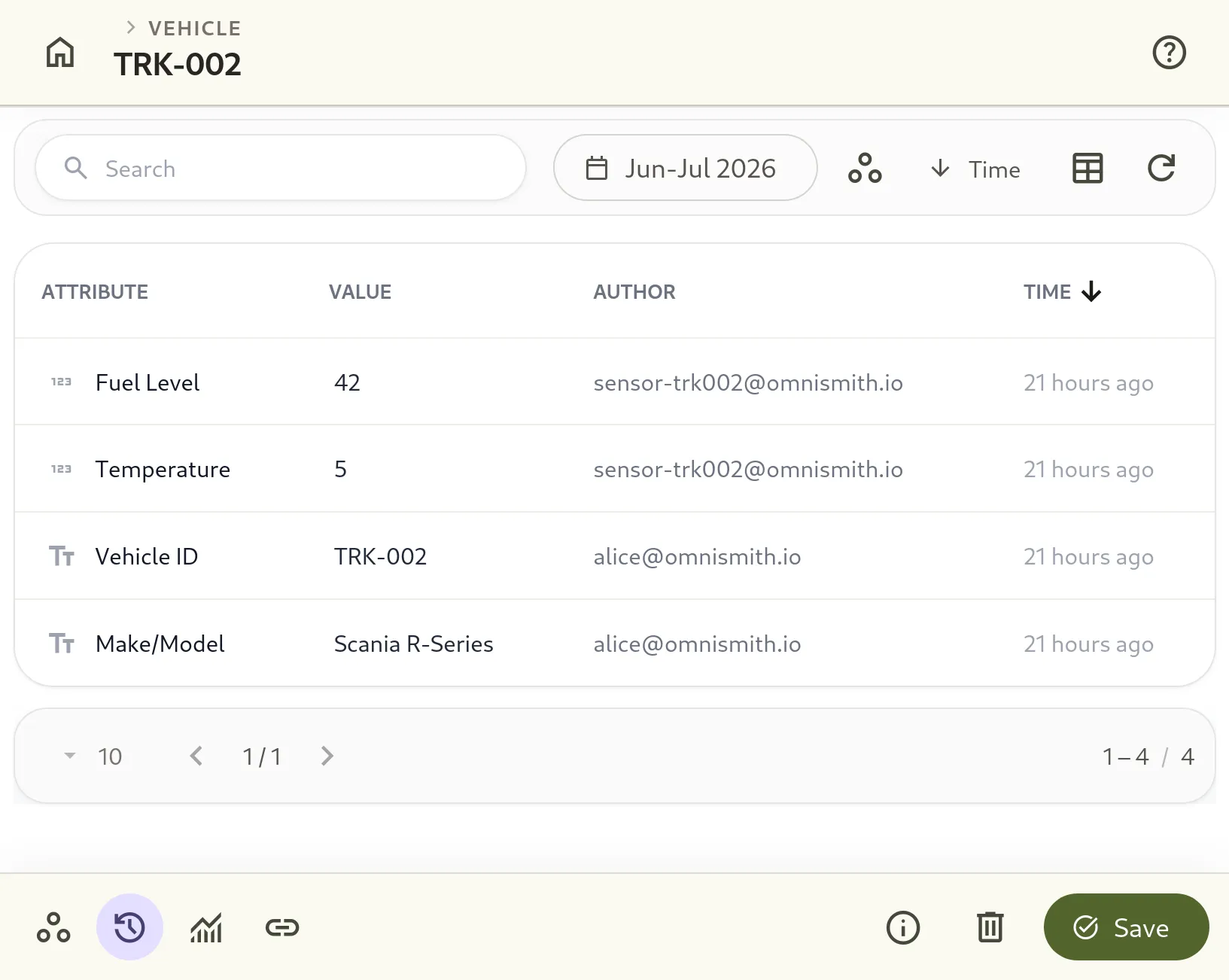
Shipmententities associated with a specific vehicle ID where the vehicle state is flagged as active. - Audit Trailing: Any change to these attributes is continuously written to an append-only transaction ledger on TimescaleDB, detailing what changed, when, and by whom from the first second of deployment.
The cold-chain fleet management model developed in this guide illustrates how natural language requirements map directly to relational schemas and telemetry databases. While built for logistics, these same AI-driven scaffolding and conversational ingestion mechanics apply to any operational domain, from facility management to hardware infrastructure tracking.
In the next entry of this series, the platform will utilize this active cold-chain database to demonstrate dynamic automations, configure multi-role access controls (RBAC/ABAC), and build real-time monitoring dashboards.
The Manual REST Alternative
To understand how the AI Assistant automates schema deployment, it is valuable to look at how a developer constructs this exact environment manually. Under the hood, Omnismith exposes structured REST endpoints to register templates and attributes dynamically at runtime.
In a traditional development cycle, creating this cold-chain fleet management schema requires sequentially executing a series of dependent API requests.
1. Creating the Templates
First, the developer must register empty template containers for each operational concept:
POST /v1/templates HTTP/1.1
Host: api.omnismith.io
Content-Type: application/json
Authorization: Bearer <token>

{
  "name": "Vehicle",
  "description": "Fleet assets equipped with environmental sensors"
}
This returns a template identifier (e.g., 019f51bf-366c-72b9-94e1-0435af01e34a), which must be recorded to associate attributes in subsequent steps.
2. Registering Attributes
Next, individual attributes must be registered and attached to their templates. For instance, creating the high-frequency environmental telemetry attribute Temperature requires specifying its metric type and numerical data type:
POST /v1/attributes HTTP/1.1
Host: api.omnismith.io
Content-Type: application/json
Authorization: Bearer <token>

{
  "name": "Temperature",
  "attribute_type": 1,
  "data_type": 1,
  "template_ids": ["019f51bf-366c-72b9-94e1-0435af01e34a"]
}
3. Establishing References
Finally, the developer must configure relational integrity for reference fields—such as linking a shipment to its assigned driver—by updating the reference configuration on the respective attribute:
PUT /v1/attributes/019f51bf-3a42-71a3-95db-3736a6ad980b/reference HTTP/1.1
Host: api.omnismith.io
Content-Type: application/json
Authorization: Bearer <token>

{
  "target_template_id": "019f51bf-3836-71a9-a8d7-d5365ee60f3d",
  "target_attribute_id": "019f51bf-373f-714f-a811-7d983da1206f"
}
While these endpoints offer complete control, building a full relational schema manually requires tracking numerous UUID dependencies and drafting boilerplate payloads.